A walk-in waitlist for nail salons
Clients check in from a QR code at the front desk, see their place in line and get a text when a technician is free. Bridal parties and birthday groups book a time ahead from your booking page.
- Check in by QR code
- A text when a station opens
- Groups book ahead
- No-show fees on Plus
- Texts for the first 25 parties a month on Free
- No card to sign up
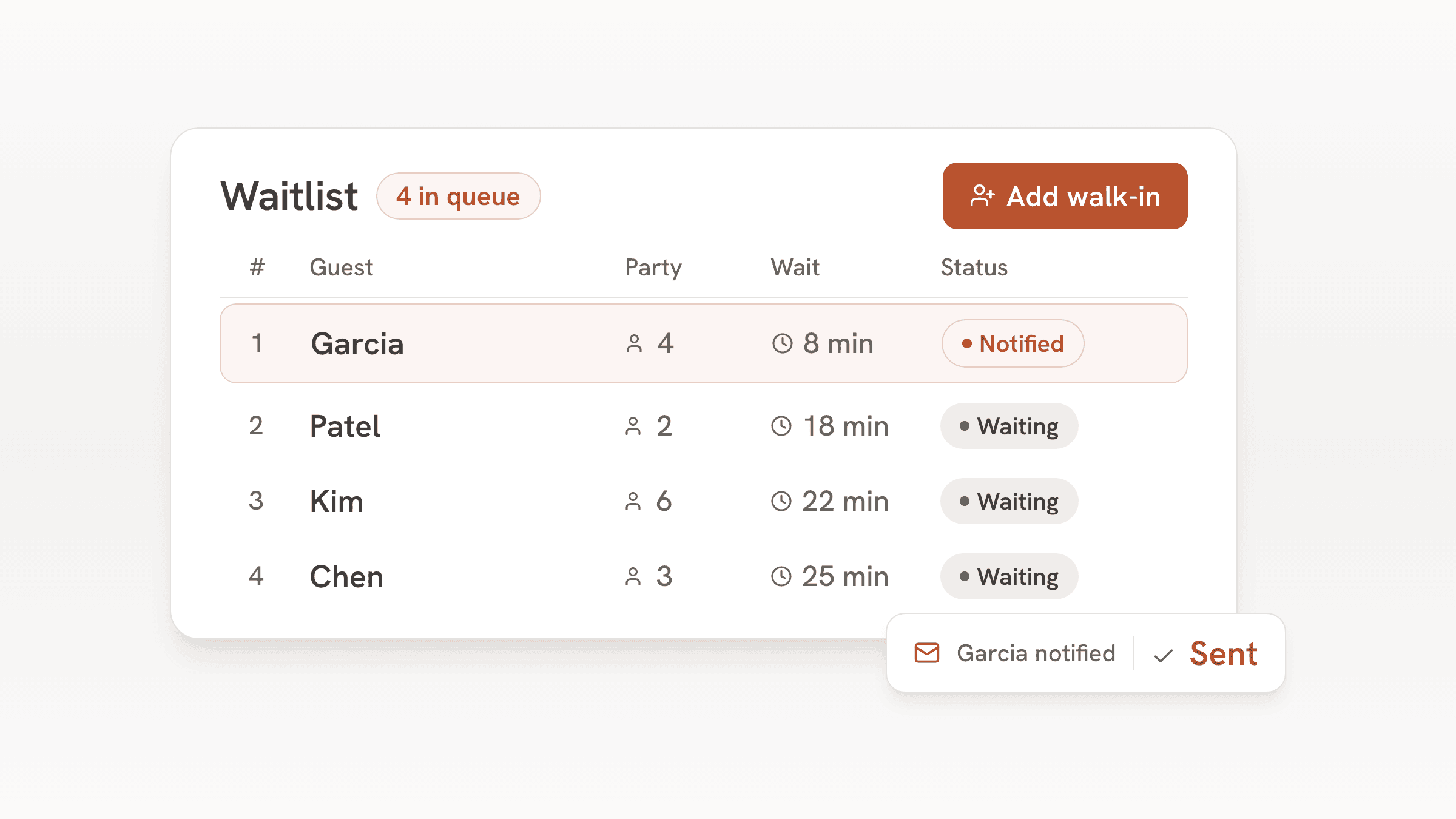
Most nail salons run two lines at once: clients with appointments, and walk-ins asking how long the wait is. The walk-in line usually lives on a sign-in sheet or in someone's head, and it falls apart on a busy Saturday when three people ask at once.
bavoli takes the walk-in line off the front desk. Clients check in on their own phone, sit down or run an errand, and get a text when a station opens. Groups who want four pedicure chairs at the same time book a start time ahead.
A Saturday at the salon
- Before opening
The day's groups are on the list
A bridal party of five booked for 10:00 and left a card for your no-show fee. The front desk knows to keep five stations free.
- 10:30
Walk-ins check in
Clients scan the QR card at the desk and enter a name, a mobile number and how many are in their group. They see their place in line and can shop nearby while they wait.
- 11:15
A station opens
The front desk taps the next client. bavoli texts them, and their status page shows it's their turn.
- 11:20
Seat them from the floor plan
Stations and pedicure chairs sit on your floor plan, so the desk can see which are taken and seat the next client with a tap.
- Closing
Your client list grows
Every walk-in and booking lands in the guest book with visit history and notes, such as a favorite shade.
What the salon uses
Front-desk check-in by QR code
Put the QR card on the desk or the window. Clients check in from their phone with no app to download.
A text when a station opens
One tap sends it. On Free the first 25 parties each month get texts, Plus texts up to 500 and Pro up to 1,500.
Group bookings
Bridal parties and birthdays book one start time for the whole group. Set how many groups can start in each time slot so two big groups never land together.
No-show fees on Plus
Hold a card on online bookings and charge a flat no-show fee only if the group doesn't come, to protect a block of stations. Needs Plus and a connected Stripe account.
Stations on a floor plan
Add manicure tables and pedicure chairs as tables on the plan. The desk sees what is free and seats with a tap.
Auto-release for no-shows
Pick a grace time from 1 to 60 minutes. A client who got the text or email and doesn't come back loses the spot and the line moves up.
Which plan fits a nail salon
Every walk-in on the list and every group booking is one party. Count them for a month and compare with the text allowances.
| Plan | Price | Texted parties | Adds |
|---|---|---|---|
| Free | $0, no end date | The first 25 parties each month | Waitlist, bookings, floor plan, guest book, website and email updates. A small bavoli badge on your pages. |
| Plus | $30 a month or $300 a year | Up to 500 parties a month | Card holds and no-show fees on online bookings. Hide the bavoli badge. |
| Pro | $60 a month or $600 a year | Up to 1,500 parties a month | Everything in Plus and a custom domain for your website. |
For example
A six-station salon that puts about 15 walk-ins a day on the list, 26 days a month, has about 390 parties a month to text. That fits Plus at $30 a month, which texts up to 500 parties a month.
For example
A busy salon that puts about 45 walk-ins a day on the list, 26 days a month, has about 1,170 parties a month to text. That fits Pro at $60 a month, which texts up to 1,500 parties a month.
A bridal party that books counts as one party, however many people are in it.
Guests add a card when they book online, and bavoli places a hold on it for the no-show fee you set. The fee is one flat amount per booking, and it is charged only if the group doesn't show. To keep it to groups, set the smallest party that can book online to your group size and let smaller parties walk in.
What bavoli doesn't do for a salon yet
These are the gaps a nail salon will notice:
- Clients can't book a specific technician, and there are no calendars per technician.
- There is no service menu with prices and lengths, so bavoli can't tell a gel manicure from a full set.
- It doesn't take payment for services or tips. The card holds and no-show fees on Plus apply to online bookings only.
- It doesn't connect to an appointment app, so if you keep one for booked clients, the front desk checks both.
- Some guest screens still use restaurant words. The booking page and the waitlist status page say "table" and "host stand" in places.
Frequently asked questions
Can I use bavoli next to my appointment app?
Yes. Keep your appointment app for booked clients and run walk-ins and group bookings through bavoli. The two don't sync, so the front desk keeps an eye on both.
Can a group book several stations at once?
Yes. A group books one start time for its party size, such as 5 people at 10:00. You set the largest group that can book online and how many groups can start in each time slot, and your team decides which stations they use.
Can I charge a deposit for bridal parties?
bavoli doesn't collect deposits up front. On Plus ($30 a month) or Pro, once you connect a Stripe account, you can protect bridal bookings with a card hold instead. Guests add a card when they book online, and bavoli places a hold on it for the no-show fee you set. The fee is one flat amount per booking, and it is charged only if the group doesn't show. To keep it to groups, set the smallest party that can book online to your group size and let smaller parties walk in.
Do clients need an app?
No. They check in on a web page from the QR code, and their place in line updates on that page.
How are texts counted?
By party. A party is one waitlist entry or one booking, and it counts once a month however many texts it gets. Free texts the first 25 parties each month, Plus up to 500 and Pro up to 1,500.
Which option do I pick when setup asks what kind of place it is?
Pick "Studio, club or walk-in venue with tables", even if some clients book ahead. The "Appointments" option is for one-on-one bookings with a chosen staff member, and setup warns that bavoli may not fit that kind of work. A salon with walk-ins and group bookings runs on the waitlist and the booking page, which the venue option sets up.